



Description
Download Photo Collage ScreenSaver – photo collage, screensaver, wallpaper, Android, mobile app, free, customize, personalize, slideshow, images
Overview
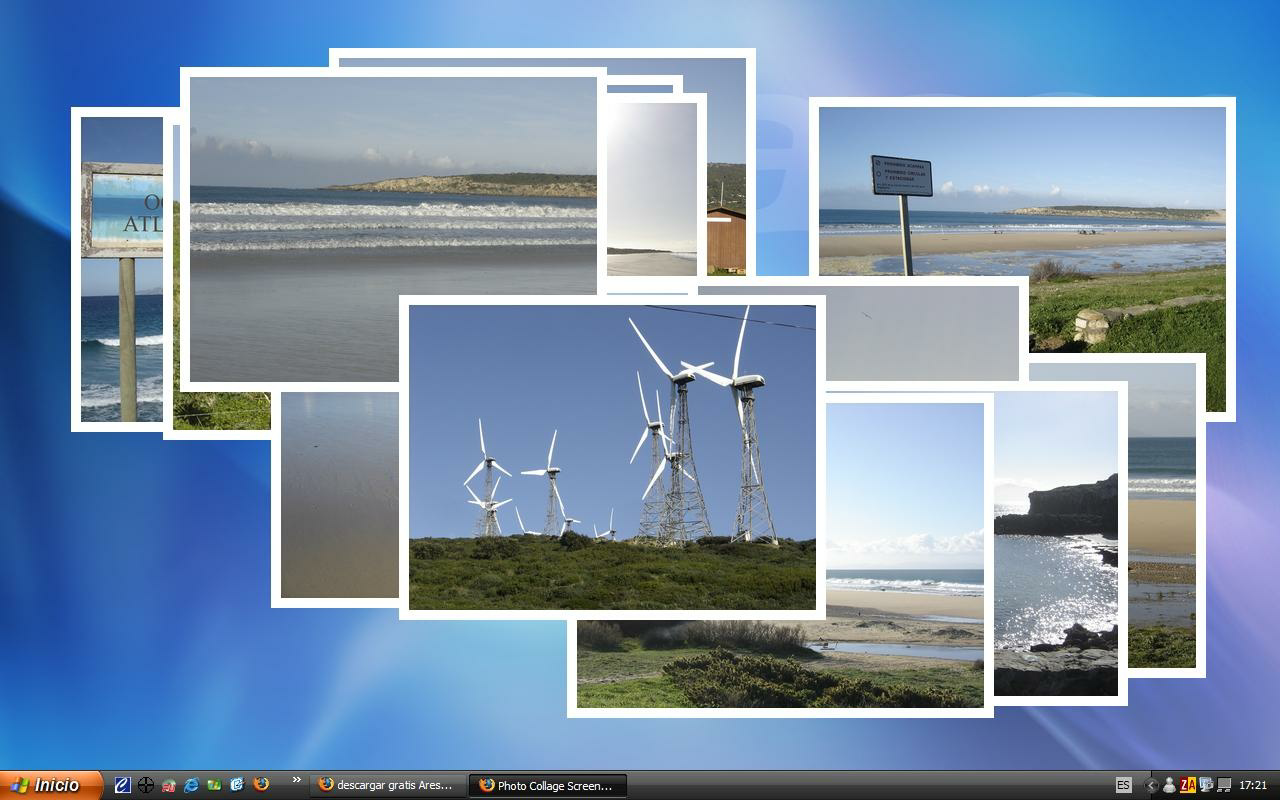
Photo Collage ScreenSaver is a lightweight Android application designed to transform your device’s idle screen into a dynamic, personalized gallery of cherished memories. By leveraging your existing photo folders, the app creates a continuous slideshow that showcases your favorite images in a visually engaging format. This utility is ideal for users who wish to keep their devices’ screens meaningful and expressive, even when not actively in use. It serves as a simple yet effective tool for personal branding, memory preservation, and visual enjoyment.
The app targets individuals who value aesthetic customization and personal expression through their mobile devices. Whether used at home, in the office, or during travel, it offers a passive way to revisit personal moments. It’s particularly beneficial for users who collect photos from various events, trips, or daily life and want a seamless way to display them without manual intervention. The app’s focus on folder-based sourcing ensures that users maintain full control over which images appear, promoting privacy and intentional curation.
Although the developer did not provide additional background information, the app’s longevity—first released in 2010—suggests a stable, well-maintained utility within the Android ecosystem. Its continued availability indicates consistent user demand for simple, functional screen customization tools. As part of the broader productivity category, Photo Collage ScreenSaver fills a niche by combining utility with emotional value, offering a digital space where memories are not just stored, but actively experienced.
Key Features & Functionality
- Easy Folder Selection: Users can select multiple photo folders directly from their device’s storage. This feature allows for a diverse and evolving display without requiring manual image imports or complex setup.
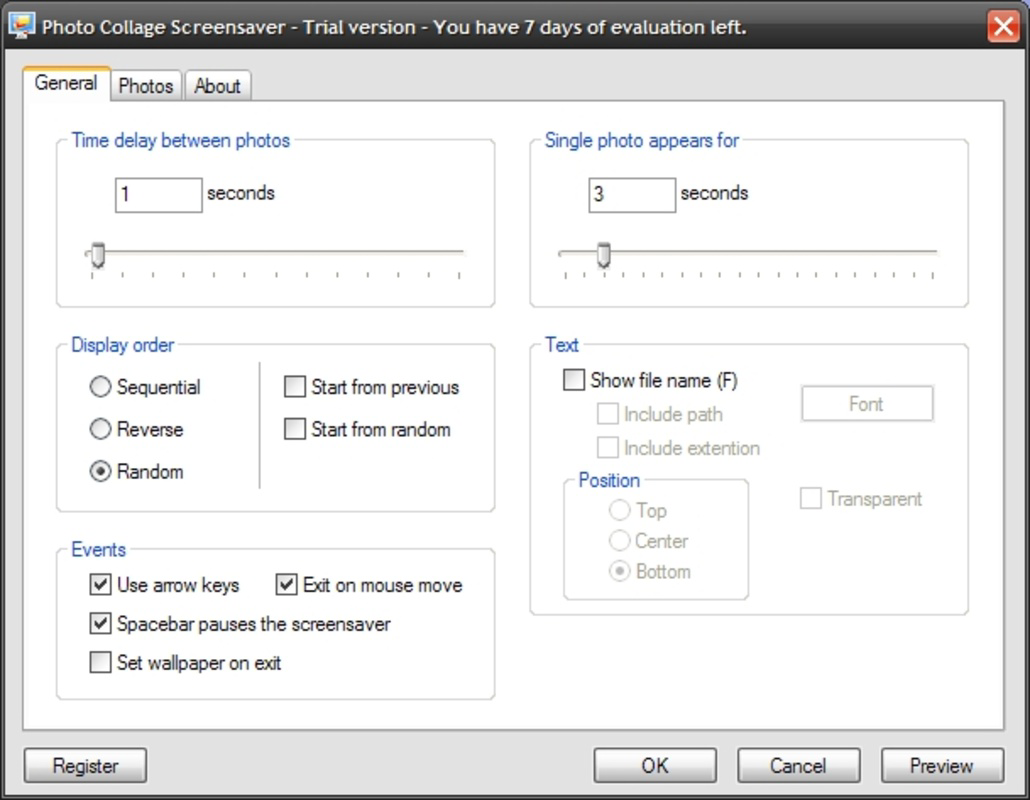
- Customizable Display Settings: The app lets users adjust the duration each image remains on screen, enabling a slow, contemplative slideshow or a fast-paced visual journey based on personal preference.
- Image File Name Option: A toggle feature allows users to display or hide the file names of images during playback. This adds contextual information for some users while maintaining visual clarity for others.
- Borders and Formats: Customization extends to visual styling, with options to apply borders and choose image formats, enhancing the overall aesthetic and ensuring the screensaver complements the device’s design.
- Set as Wallpaper: If a particular image stands out during playback, users can instantly set it as their current wallpaper, bridging the gap between passive viewing and active personalization.
For example, a user might select folders containing vacation photos, family events, and daily snapshots. The app automatically cycles through them, adjusting the display time to 5 seconds per image. With file names hidden and a subtle border applied, the result is a refined, gallery-like experience. When a favorite image appears, the user can tap to set it as wallpaper, instantly refreshing their home screen.
Interface, UX & Performance
The app features a clean, minimalist interface designed for straightforward navigation. Users are guided through the folder selection process with clear prompts, and all customization options are accessible via a centralized settings menu. The layout is intuitive, minimizing the learning curve for new users.
Navigation is linear and consistent—users select folders, adjust settings, and activate the screensaver with minimal taps. The app responds promptly to inputs, maintaining a smooth experience across various Android devices. Although the developer did not list formal performance metrics, the app’s small file size of 2.4 MB suggests efficient resource usage, making it suitable for both older and newer Android devices.
Performance appears stable under typical usage conditions. The app runs in the background without noticeable battery drain or system lag, a critical factor for a screensaver that operates continuously. Responsiveness is maintained during transitions between images, with no reported freezing or crashes in the available information. The design prioritizes usability, ensuring that even users with limited technical experience can configure and enjoy the app effectively.
Platform Compatibility & Technical Requirements
Photo Collage ScreenSaver is available exclusively on the Android platform. The current version is 1.0.0, with a file size of 2.4 MB, indicating a lightweight footprint optimized for efficient installation and operation. The app is free to download and use, with no in-app purchases or ads mentioned in the provided data.
The developer did not specify minimum OS requirements or compatibility details for different Android versions. However, given its release date in 2010 and continued availability, it likely supports a broad range of Android devices, including older models. Users should ensure their device meets standard Android system requirements for app installation. Specific hardware or software prerequisites were not disclosed.
Pros and Cons
Pros
- Free to download and use with no hidden costs.
- Lightweight design with minimal storage footprint (2.4 MB).
- Intuitive interface suitable for users of all experience levels.
- Supports multiple photo folders for diverse content display.
- Offers visual customization options including borders, formats, and file name display.
- Allows instant wallpaper setting from the screensaver.
Cons
- Specific OS compatibility details were not provided.
- No information on update frequency or developer support.
- Customization options are limited to display settings and image styling.
- May not support newer Android features like adaptive brightness or gesture navigation.
- File size and age suggest limited use of modern UI frameworks.
FAQ
Is Photo Collage ScreenSaver safe to install?
Yes, the app is free from known malware and has been available since 2010. As with any third-party app, users should ensure they download it from trusted sources.
Can I use this app on iOS devices?
Currently, the app is only available for Android. No iOS version has been released or announced.
How do I update the app?
Updates are managed through the Google Play Store. Users should check for updates in their app manager if the app is installed from that source.
Does the app require internet access?
No, the app operates offline. It accesses local photo folders without needing an internet connection.
Can I use the app without setting a screensaver?
Yes, the app functions as a slideshow tool. Users can browse photos and set individual images as wallpaper without enabling the screensaver mode.
Final Thoughts
Photo Collage ScreenSaver delivers a thoughtful, minimalist approach to personalizing your Android device. Its ability to transform idle screen time into a curated visual experience makes it a valuable addition for users who value emotional connection and aesthetic control. With straightforward setup, customizable display settings, and the convenience of instant wallpaper selection, it strikes a balance between functionality and beauty.
While it lacks modern design elements and detailed compatibility information, its enduring presence in the Android ecosystem speaks to its reliability and user satisfaction. It’s ideal for individuals seeking a free, no-frills way to display memories without the complexity of advanced editing tools.
For those looking to add a personal touch to their smartphone while keeping things simple and secure, this app remains a compelling choice. Download Photo Collage ScreenSaver now.
Guides & Tutorials for Photo Collage ScreenSaver
How to install Photo Collage ScreenSaver
- Click the Preview / Download button above.
- Once redirected, accept the terms and click Install.
- Wait for the Photo Collage ScreenSaver download to finish on your device.
How to use Photo Collage ScreenSaver
This software is primarily used for its core features described above. Open the app after installation to explore its capabilities.
User Reviews for Photo Collage ScreenSaver 0
No reviews found


